Step-by-step guide
How to get documents and payments from Zettl into POHODA
Two ways: download a ZIP of XML and import it in POHODA with the XML import/export wizard, or let Zettl send the month straight into POHODA through POHODA mServer. A month's received documents and bank movements go across; issued invoices leave as ISDOC.
4 steps
How it works
Settings → Accounting
The export, the mServer connection and a short guide are in one place in Zettl: Settings → Accounting.
Way 1: ZIP and XML import
Pick the month, download the ZIP and import it in POHODA through Soubor / Datová komunikace / XML import/export.
Way 2: directly via mServer
If POHODA mServer is reachable from the internet over HTTPS, enter its address, user and password and send the month with one button.
Repeat without duplicates
Documents keep fixed numbers: POHODA won't accept what it already has, and over mServer Zettl doesn't even send it again.
Way 1
ZIP from Zettl → XML import in POHODA
Works with any POHODA where you may use the XML import. Nothing to set up: download the file and import it.
In Zettl
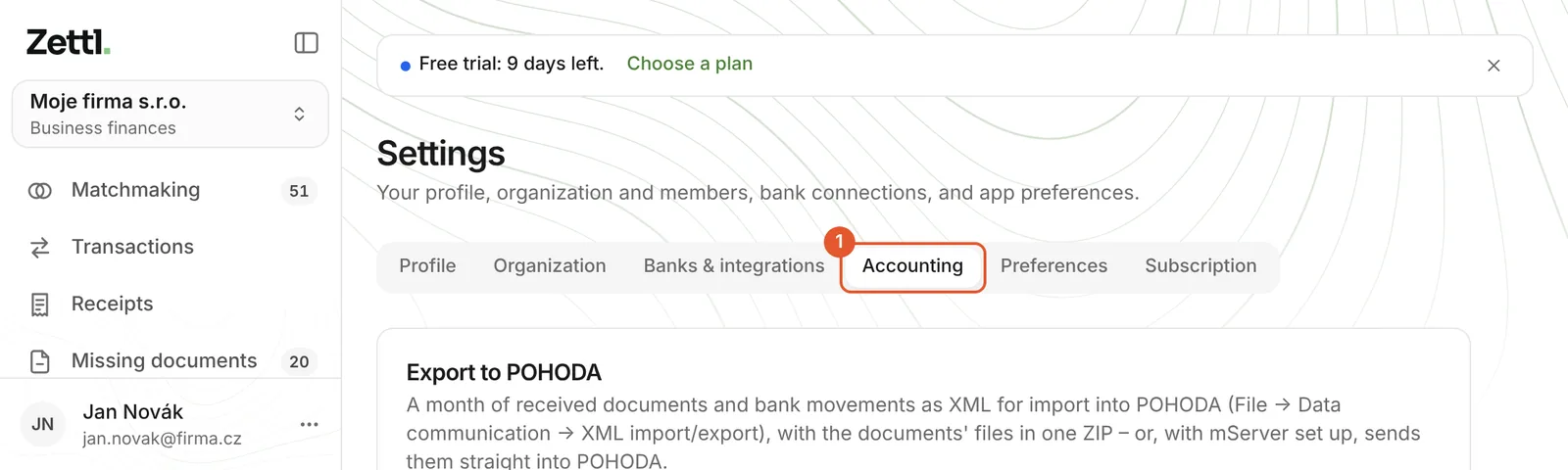
Open Settings → Accounting
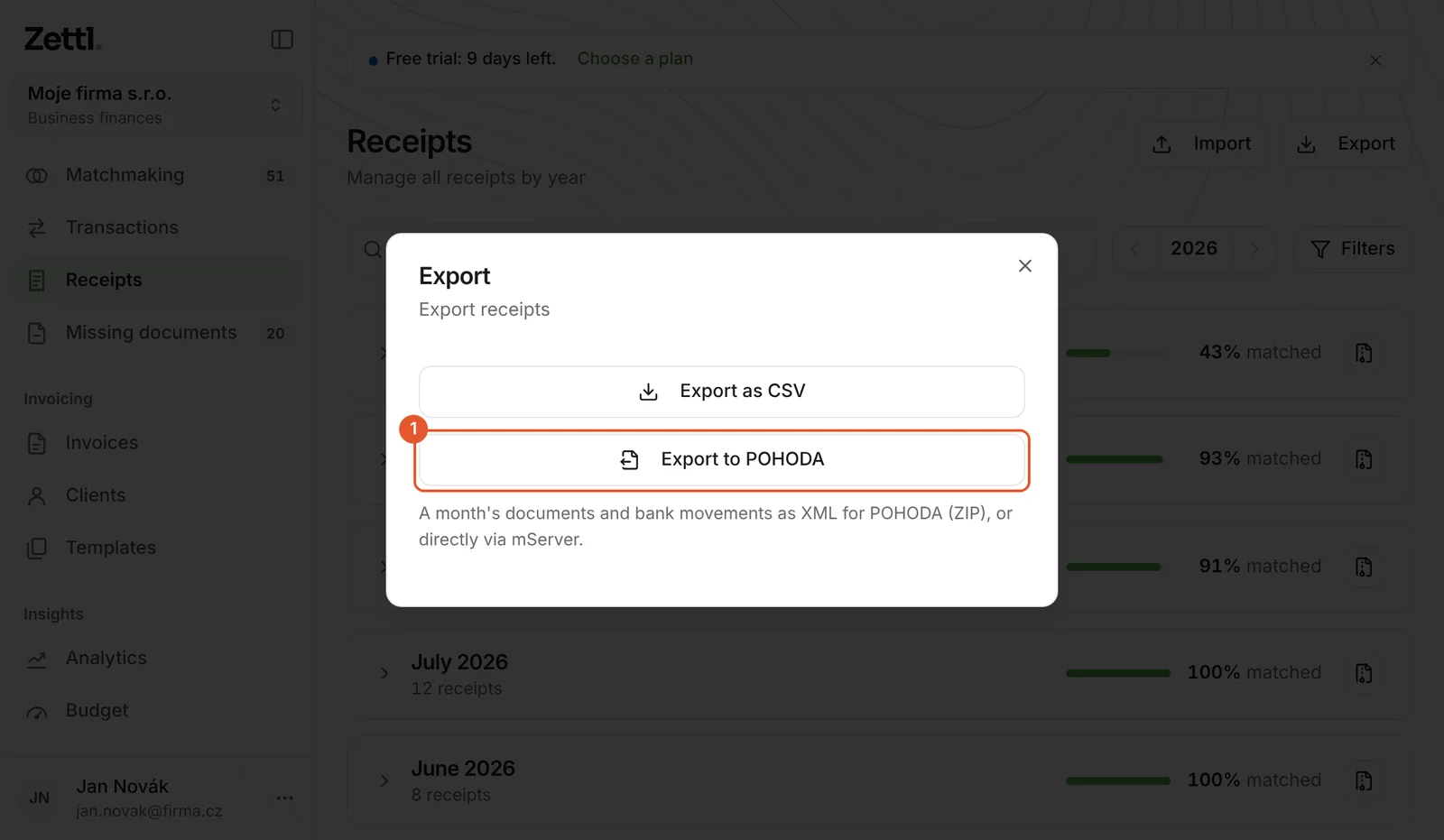
Everything about POHODA is in one place. Receipts → Export → Export to POHODA leads to the same page.
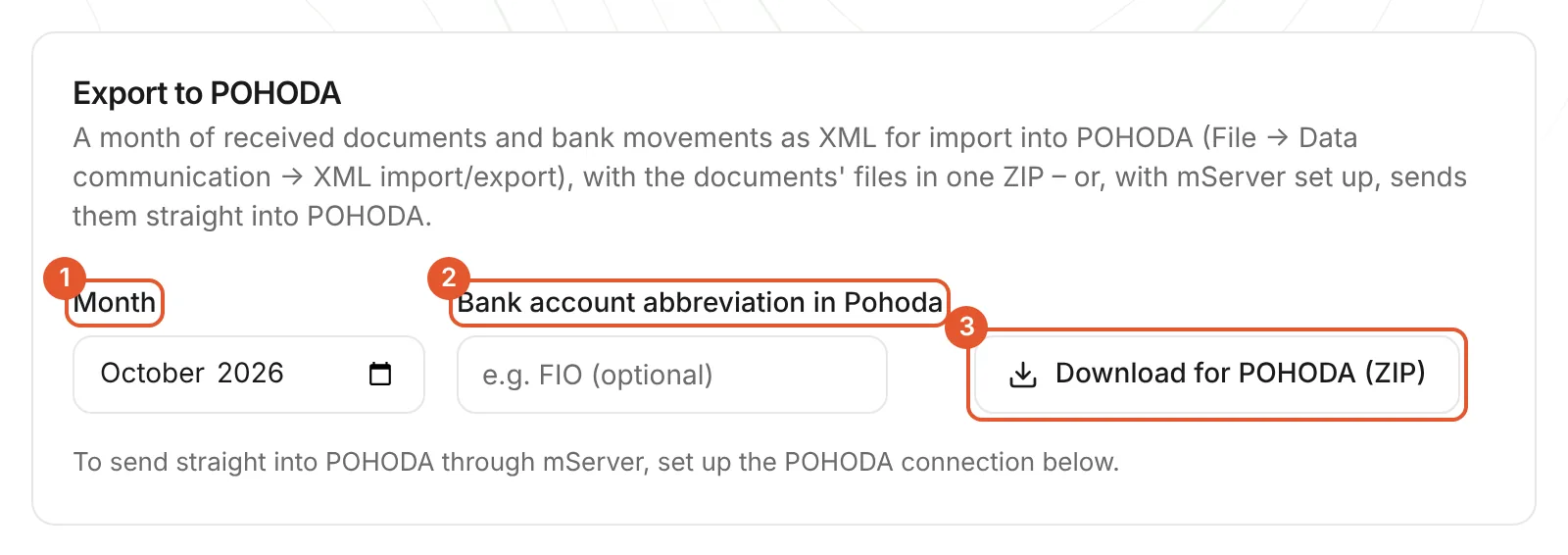
Pick the month and download the ZIP
① the month, ② optionally the abbreviation of the bank account in POHODA (otherwise POHODA uses its default account), ③ Download for POHODA (ZIP). The company needs its IČO under Settings → Organization.
What's in the ZIP
Two XML files in the format POHODA imports (version 2, Windows-1250 encoding) and a folder with the document files. Unzip it and import from the extracted folder – the links to the files point into the doklady folder.
pohoda-<firma>-<RRRR-MM>.zip
- prijate-doklady.xmlthe month's received documents (Received invoices agenda)
- banka.xmlaccount movements (Bank agenda)
- doklady/the document files (PDF, images)
In POHODA
Start the XML processing wizard
From the menu Soubor / Datová komunikace / XML import/export… (as POHODA's manual names it; the Czech menu names are kept). Choose processing a single file.
Import prijate-doklady.xml, then banka.xml
In the field Vstupní složka nebo soubor (request) pick prijate-doklady.xml. The field Výstupní složka nebo soubor (response) can stay empty. Finish the wizard, then repeat it for banka.xml.
Check the result
The import result is in the agenda Soubor / Datová komunikace / XML log. The documents land in the agenda Fakturace / Přijaté faktury, the movements in Účetnictví / Banka.
Pair payments with documents
In the Banka agenda, with Záznam / Operace / Automatická likvidace…. POHODA pairs documents that carry a variable symbol; your own rules go in the Pravidla párování dokladů agenda (Nastavení / Homebanking). A payment Zettl matched to one document also carries that document's pairing symbol.
The menu names are from POHODA's manual and may differ slightly by your POHODA version. Try the first import on a single month.
Way 2
Straight into POHODA via mServer
No download or import: Zettl sends the month straight into POHODA and shows how each document went. It needs POHODA mServer reachable from the internet.
What mServer is
Per Stormware, POHODA mServer is an HTTP server that transfers XML data as request–response pairs, and it is part of POHODA. It runs on the computer or server where your POHODA is, accepts XML from Zettl and imports it into the accounting unit just like the manual XML import.
What you need on the POHODA side
- A POHODA in which you may use mServer – whether your edition and licence include it, check against your POHODA version.
- A computer or server where POHODA with mServer runs when you send. Stormware recommends a server operating system in an internal network and advises against running mServer non-stop – it only needs to run while you send.
- Reachability from the internet over HTTPS: a public address (a public IP or a domain) and mServer's port forwarded on the router. A network admin or IT company usually sets this up. Without it, use the ZIP – it always works.
Setting it up in POHODA
A user for Zettl
In the agenda Nastavení / Přístupová práva / Uživatelé create a user (or use an existing one) and allow the branches Práva / Soubor / Datová komunikace and Práva / Administrátorské funkce / POHODA mServer. The user also needs access to the accounting unit and the right to write to the Přijaté faktury and Banka agendas.
The mServer configuration
In the Účetní jednotky agenda: Databáze / POHODA mServer, button Nový. On the Základní tab pick the accounting unit and the port; on the HTTPS tab switch on HTTPS. Start the configuration with Spustit.
The address for Zettl
The address looks like https://your-domain-or-ip:port – without /xml or any other path. Zettl adds /xml and /status itself.
In Zettl
POHODA connection
Settings → Accounting → POHODA connection (expand it). Fill in ① the mServer address, ② the user, ③ the password and ④ the IČO if it differs from the company's, ⑤ save and ⑥ test the connection. Zettl stores the password encrypted and never shows it again; the company's owner or an admin sets up the connection.
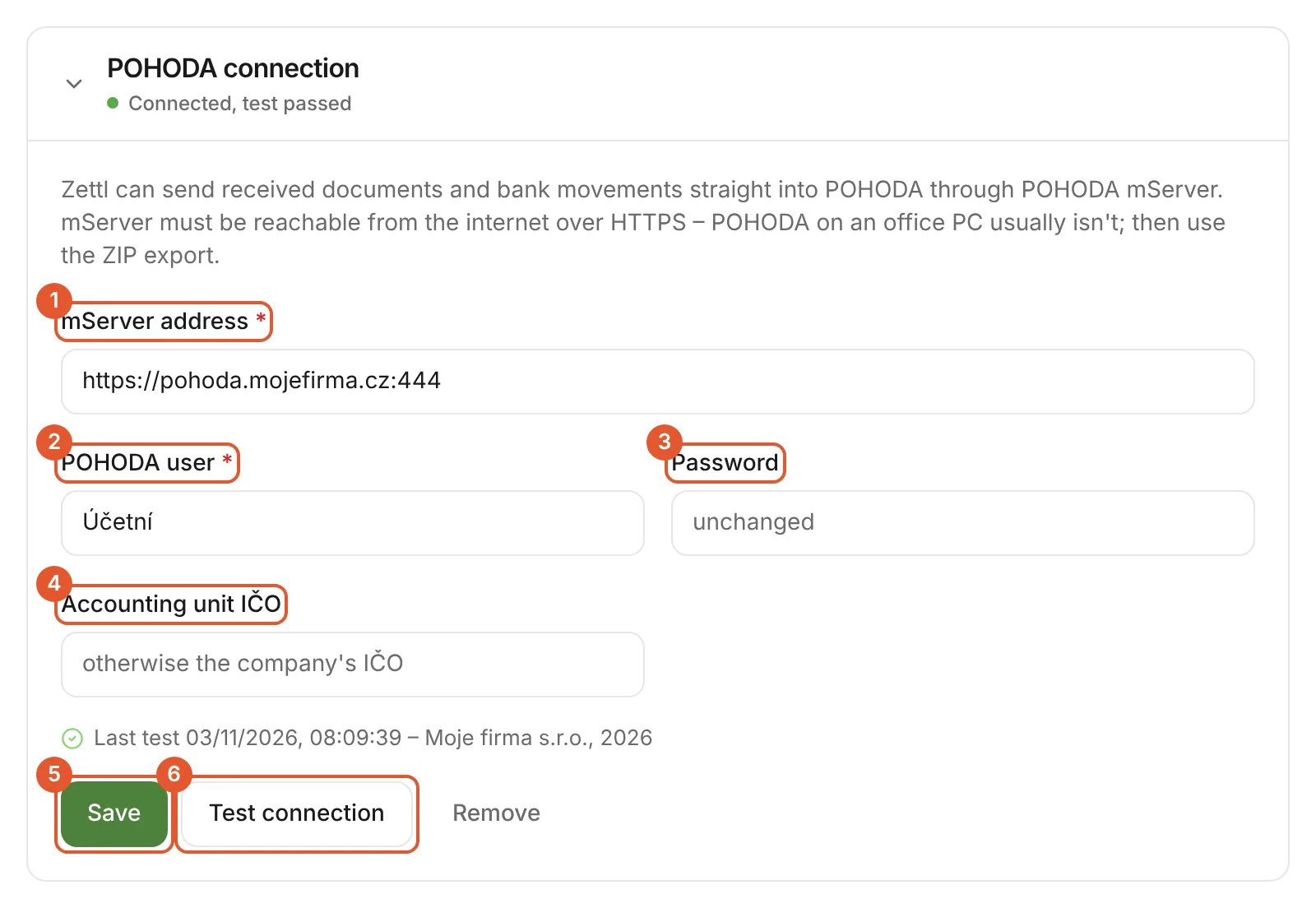
The test asks mServer for its status and the accounting unit's name. When it passes, the connection shows a green state and the company name from POHODA.
Send the month
On the Export to POHODA card pick the month and click ① Send to POHODA. Below it you see ② the result for each document and movement:
- In POHODA – imported, with its number in POHODA.
- Already there – POHODA already has it (e.g. from an earlier import); nothing is duplicated.
- Error – with the text POHODA returned (e.g. a bank account abbreviation that doesn't exist). Fix it and send again.
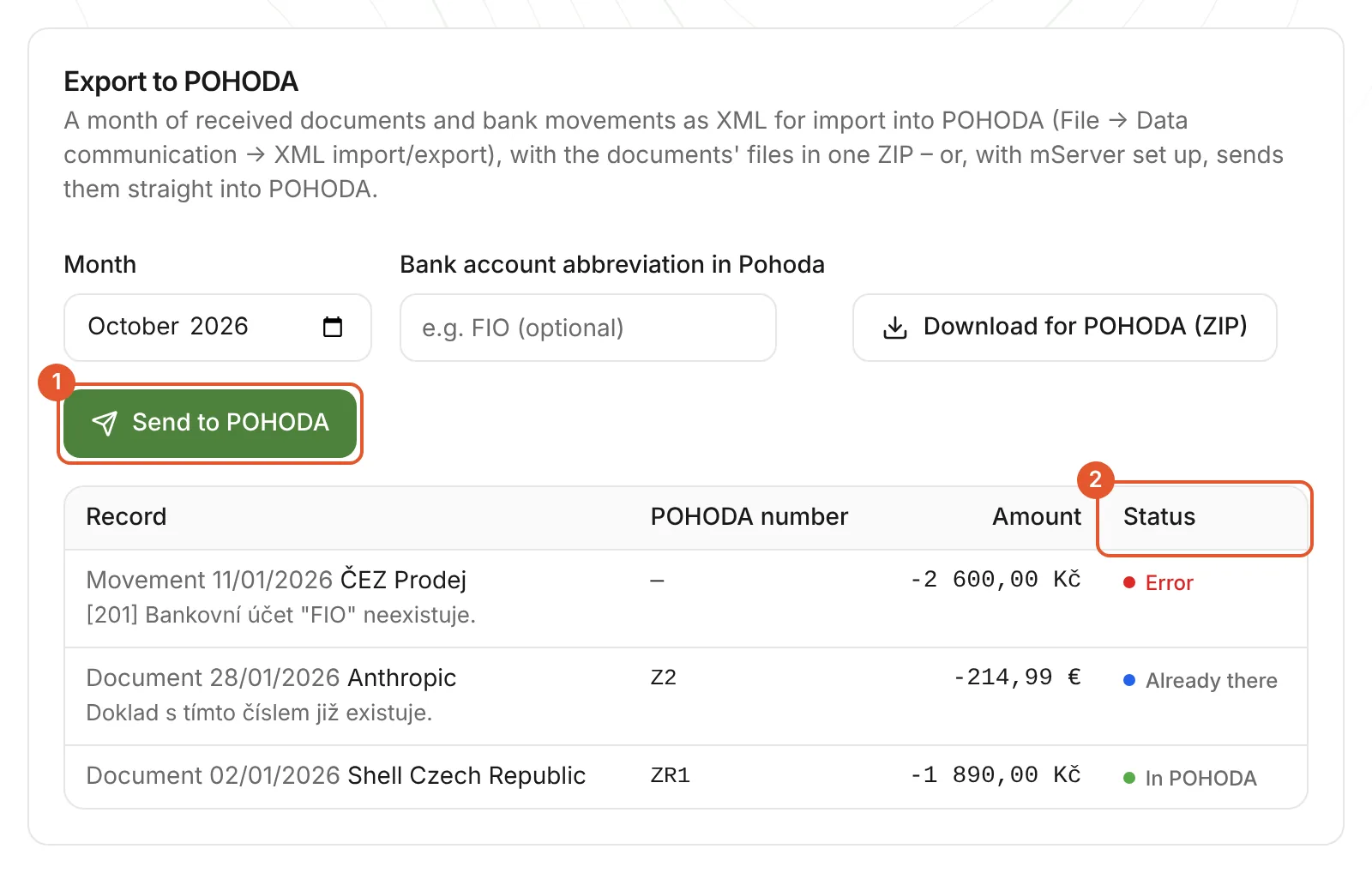
When you send the same month again, Zettl skips everything POHODA already has and sends only new documents and the failed ones. Document files are not sent through mServer; they are in the ZIP and in Zettl.
Troubleshooting
The messages Zettl shows when connecting and sending, what they mean and what to do.
| Message in Zettl | Cause | What to do |
|---|---|---|
| mServer cannot be reached from the internet. POHODA on an office PC usually isn't – use the ZIP, or expose mServer over HTTPS (see help). | Zettl could not reach the address: mServer isn't running, the port isn't reachable from the internet, or a firewall blocks it. | Start mServer in POHODA, check the port forwarding and firewall. If that's not possible, use the ZIP. |
| mServer did not answer within 25 s. Try again; what POHODA already has is not sent twice. | mServer did not answer within 25 seconds (POHODA is busy or processing another request). | Send again. Zettl does not resend what POHODA already has. |
| mServer could not process the request in time. Try again. | mServer answered that it could not process the request in time (HTTP 408). | Send again, ideally at a quieter time. |
| POHODA rejected the user name or password. | POHODA doesn't know the user or the password is wrong (HTTP 401). | Check the user name in POHODA and save the password in Zettl again. |
| The user may not open the accounting unit or use XML communication in POHODA. | The user may not open the accounting unit or use XML communication (HTTP 403). | In the Access rights agenda, allow the branches Rights/File/Data communication and Rights/Administrator functions/POHODA mServer. |
| No mServer at this address (404). Check the address and port. | No mServer at this address (HTTP 404) – usually a different port, or an address with a path. | Enter just https://server:port, without /xml or any other path. |
| The address does not answer like a POHODA mServer. | Something other than POHODA mServer answers at this address. | Check the port in mServer's settings. |
| mServer redirects – enter its direct address. | The server redirects to another address. | Enter the final address directly (https, the right port). |
| The address must start with https://. | The address starts with http://. | Switch on HTTPS in mServer's settings (HTTPS tab) and enter the address with https://. |
| The address points into a private network (localhost, 10.x, 192.168.x…). Zettl only calls public addresses. | The address points into an internal network (localhost, 192.168.…, 10.…, a name without a dot). Zettl runs in the cloud and cannot see it. | Use a public address (a public IP or a domain with a forwarded port), or the ZIP. |
| The server name does not resolve (DNS). | The server name does not exist in DNS. | Check for a typo and the domain's DNS record. |
| The accounting unit's IČO is missing (in the connection or company settings). | The accounting unit's IČO is missing. POHODA only accepts data for the unit with the same IČO. | Add the IČO under Settings → Organization, or in the POHODA connection. |
| Only the company's owner or an admin can change the connection. | Only the company's owner or an admin in Zettl can change the connection. | Ask the company's owner. |
| Too many attempts, try again shortly. | Too many attempts in an hour (limit 60). | Wait and try again later. |
Good to know
- POHODA's menu names and procedures come from Stormware's public documentation and may differ by your POHODA version. The screenshots show Zettl only.
- Older Stormware documentation pages put the XML communication right under Rights / File / Database, newer ones under Rights / File / Data communication.
- For received documents Zettl stores no VAT breakdown, supplier IČO/DIČ or taxable supply date: a document arrives as its total without a VAT rate, for the accountant to split.
- Import bank movements either from Zettl or from a statement straight into POHODA – not both, or they will be there twice.
We checked the facts about POHODA on 2026-11-03 in the maker's public documentation: Příručka POHODA: XML import/export, XML log, Banka (automatická likvidace), Přijaté faktury, Přístupová práva, POHODA mServer, Nastavení mServeru, Spuštění mServeru, mServer pro vývojáře, XML schéma faktur (invoice.xsd).
Frequently asked questions
Short answers on this topic.
What happens if I import or send a month again?
Each document gets a fixed number in POHODA derived from Zettl, so POHODA refuses a document it already has and adds the new ones. Bank movements have no such number, so import banka.xml for a month only once. Over mServer, Zettl remembers what POHODA already has and sends only new documents and movements and the ones that failed.
What does not go into POHODA?
Issued invoices (they leave as ISDOC), the VAT breakdown, supplier IČO and DIČ, taxable supply date and due date of received documents, and posting rules. Over mServer the document files don't go across either; they are in the ZIP.
Which POHODA agendas do the documents land in?
Received documents land in the Přijaté faktury agenda (Fakturace menu), bank movements in the Banka agenda (Účetnictví menu). The XML log agenda shows the import result.
Who needs which access?
In Zettl any member of the company can download the export and send the month; the owner or an admin sets up the mServer connection. In POHODA the user needs the XML communication right, access to the accounting unit and write access to the Přijaté faktury and Banka agendas; for mServer also the Administrator functions / POHODA mServer branch.
Do I need mServer?
No. The ZIP of XML works without mServer and without any connection. mServer only saves the download and the manual import, but it must be reachable from the internet over HTTPS.
Must mServer run all the time?
No. It only has to run while you send from Zettl. Stormware does not recommend running mServer non-stop.
Read next
- Zettl and POHODAZettl collects documents and matches them with Fio payments. Each month it sends them straight into POHODA through mServer, or you download a ZIP of XML for import.
- Monthly files for your accountantZettl shows which payments still lack a document and downloads the month's receipts as one PDF with a summary. The Fio statement as PDF, payments as CSV.
- For accountantsYour client forwards documents to the company address, Zettl matches them with Fio payments and you see what's missing. Each month: a PDF of documents, the Fio statement, CSV and ISDOC.
- ISDOC invoice exportExport invoices issued in Zettl to ISDOC 6.0.2: one as an .isdoc file, several at once as a ZIP. Foreign-currency invoices get the ČNB rate.